Shihui Ruan

Case Study · Georgia Institute of Technology

Redesigning navigation for 2,000+ students a day

The Georgia Tech College of Computing website had a broken information architecture that made critical resources hard to find. Over 4 months, I led research, synthesis, and design — resulting in measurably faster task completion and significantly higher expert scores across all usability dimensions.

UX Designer User Researcher Aug – Dec 2019 Team of 5
Add hero image
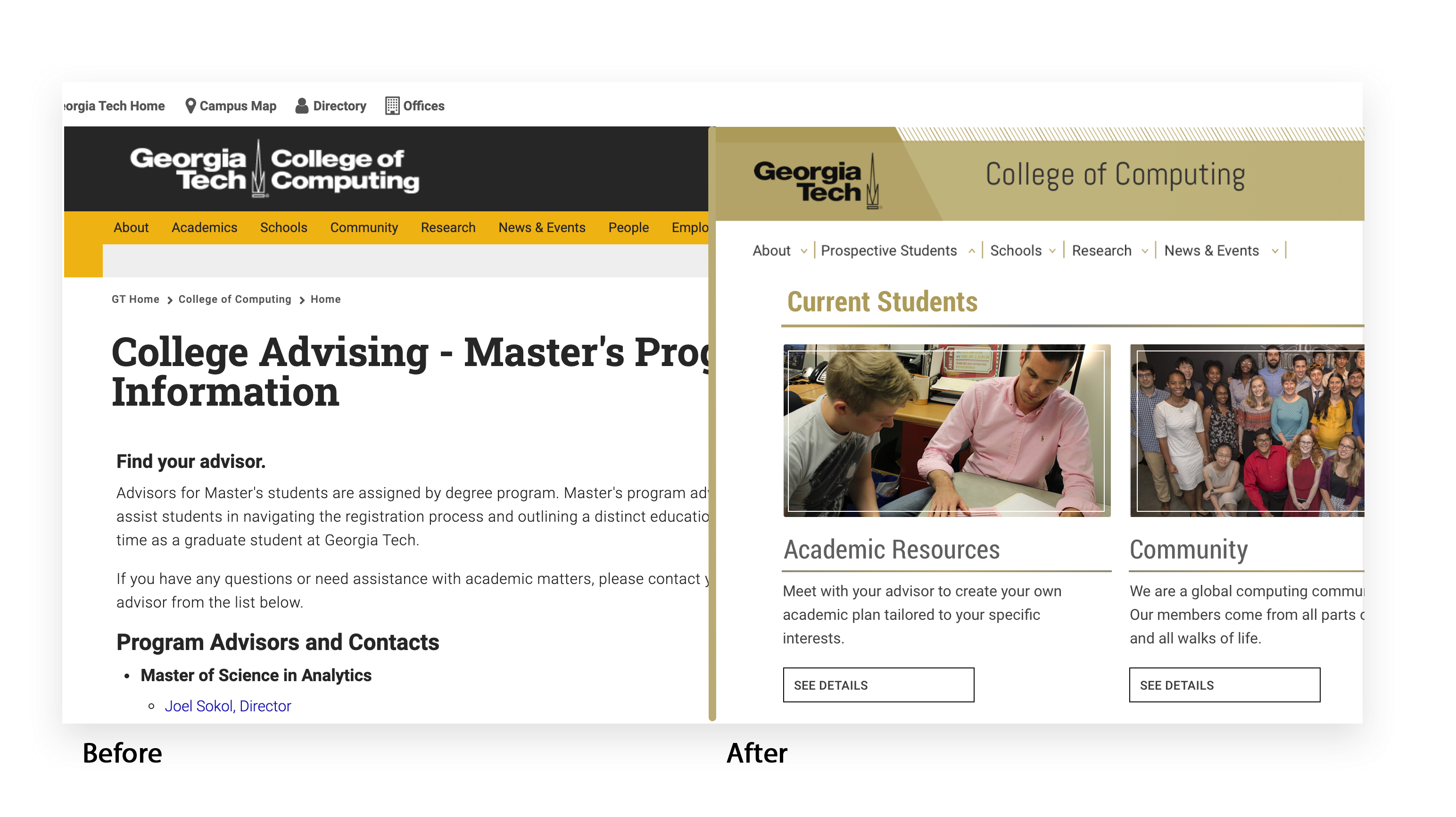
(before / after screenshot)

The redesign worked.
Here’s the proof.

Information Architecture

Before
2.5
After
3.33

Design & Branding

Before
2.3
After
3.75 ↑

Biggest single improvement — +63%

Content

Before
3.6
After
3.70

Accessibility

Before
3.0
After
3.73

Heuristic evaluation by 4 independent HCI experts. Scores on a scale of 1–5.

A/B Testing on usertesting.com confirmed significant gains

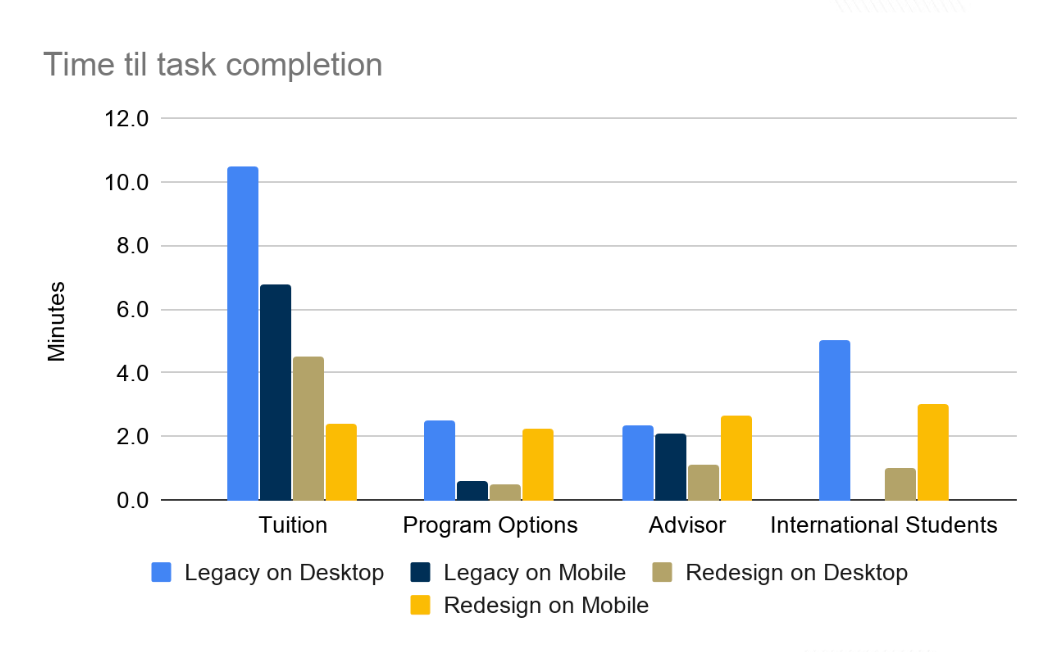
Participants completed tasks faster on the redesigned prototype across all 4 scenarios — with the most dramatic improvements in finding tuition information and international student resources, which had been the most broken user journeys in the original site.

Survey responses collected

Expert HCI evaluators

Usability dimensions improved

+

Daily users impacted

2,000+ students daily.
A website that worked against them.

The Georgia Tech College of Computing website is visited by over 2,000 users a day — prospective students, current students, faculty, and researchers. Yet the information architecture was built around content categories, not user roles, making even simple tasks like finding tuition or course info require multiple frustrating redirections.

Broken navigation

Categories like "About" and "People" didn't match how students thought about the site. Users opened tabs only to find they weren't where they needed to be.

No mobile experience

The site was not responsive. Pages weren't optimized for different screen sizes, causing low engagement and high abandonment on mobile devices.

Accessibility failures

The site didn't meet Level A or AA accessibility standards. Linked text was redundant, images lacked proper alt text, and color contrast was insufficient.

Content overload

Pages were too long with too much information competing for attention. No clear visual hierarchy guided users to the most important content.

Add: screenshot of original CoC website showing navigation problems
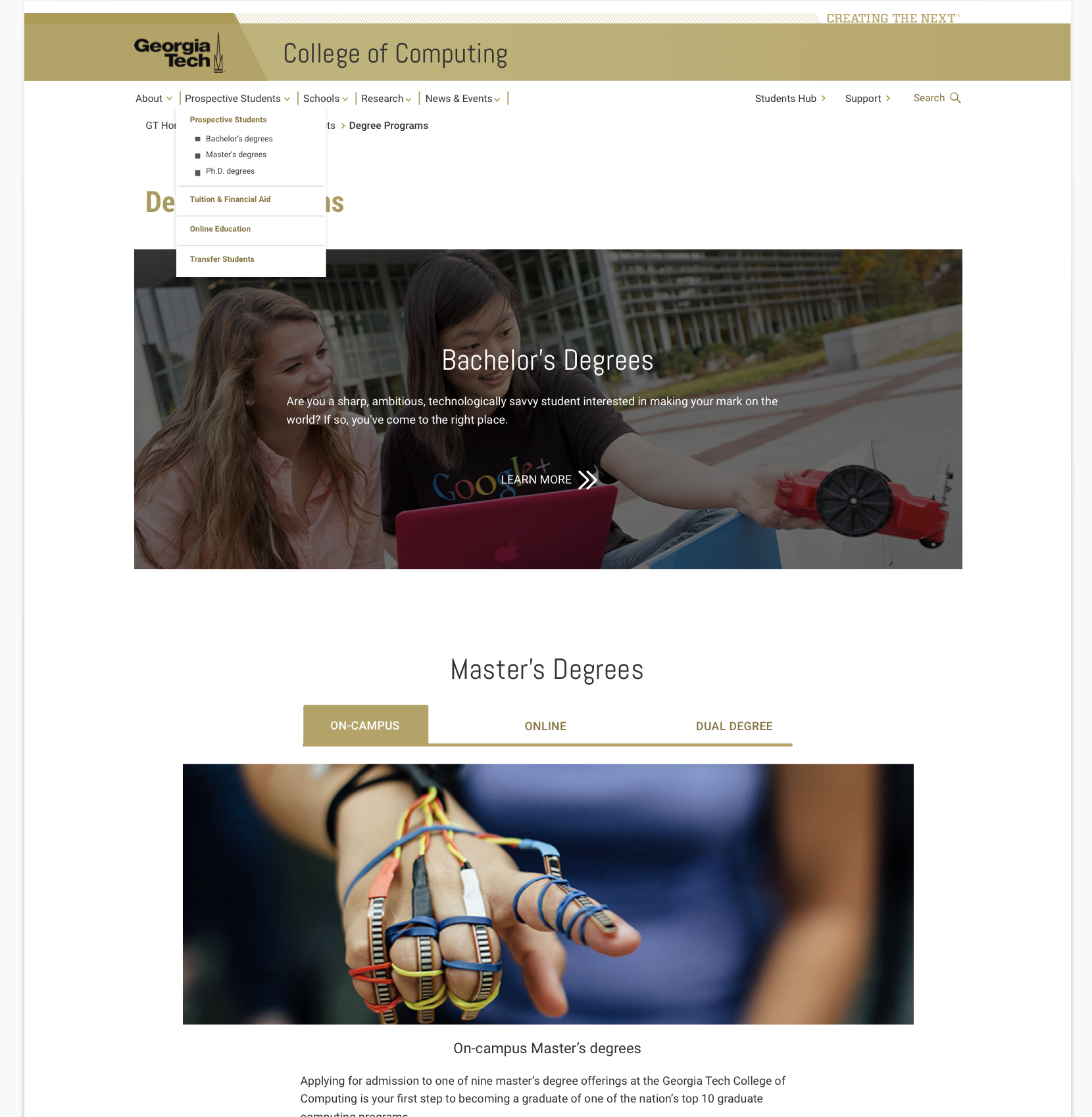
The original Georgia Tech College of Computing website — navigation built around content types, not user roles

Five methods.
One clear picture.

We used a mixed-methods approach to understand both the quantitative landscape (what pages students actually visited, how long they stayed) and the qualitative reality (why navigation felt broken, what students actually needed). No single method told the full story — all five were necessary.

Survey

responses

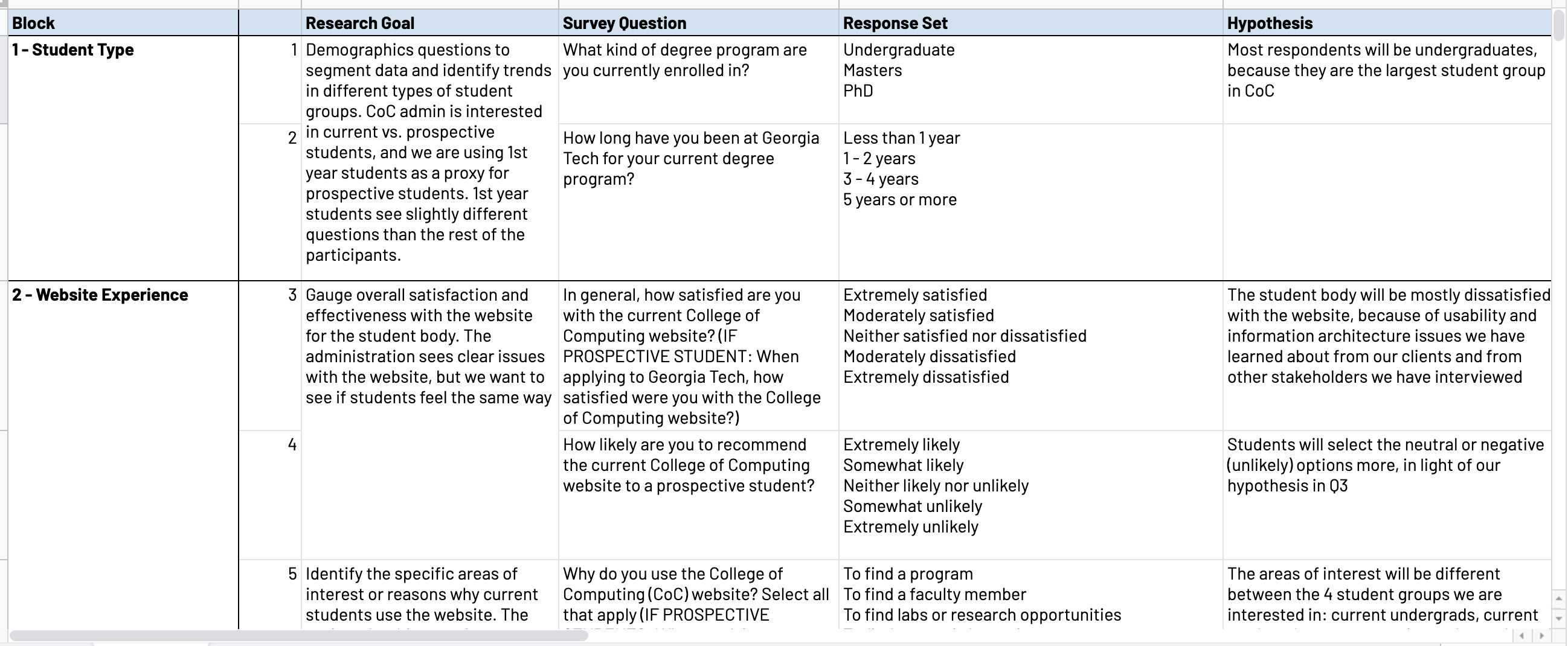
We surveyed current and prospective students to identify challenges and goals when using the site. The top finding: finding topics of interest was the primary struggle. Students also reported low confidence navigating to specific program information.

Add: survey questions table screenshot

Stakeholder Interviews

Key decision makers

We interviewed administrators and accessibility practitioners to understand institutional goals and constraints. Their perspectives shaped which design directions were feasible and what “success” meant beyond user satisfaction.

“Our website lacks clear navigation to useful resources for students.”
— Director of Academic Programs
“Truly accessible websites require usability and programmatic testing.”
— QA Accessibility Analyst, Center for Inclusive Design & Innovation

Google Analytics

12 months of data

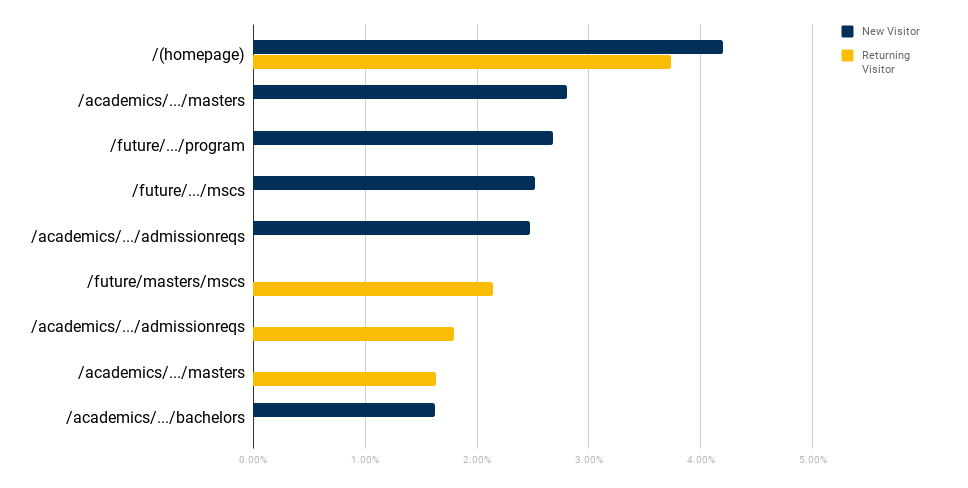
Analytics revealed that master’s degree pages and admissions were the most visited content — yet getting to these destinations required several redirections. The gap between what students wanted and how the site was organized was stark.

Add: Google Analytics content drill-down chart

Card Sorting

students

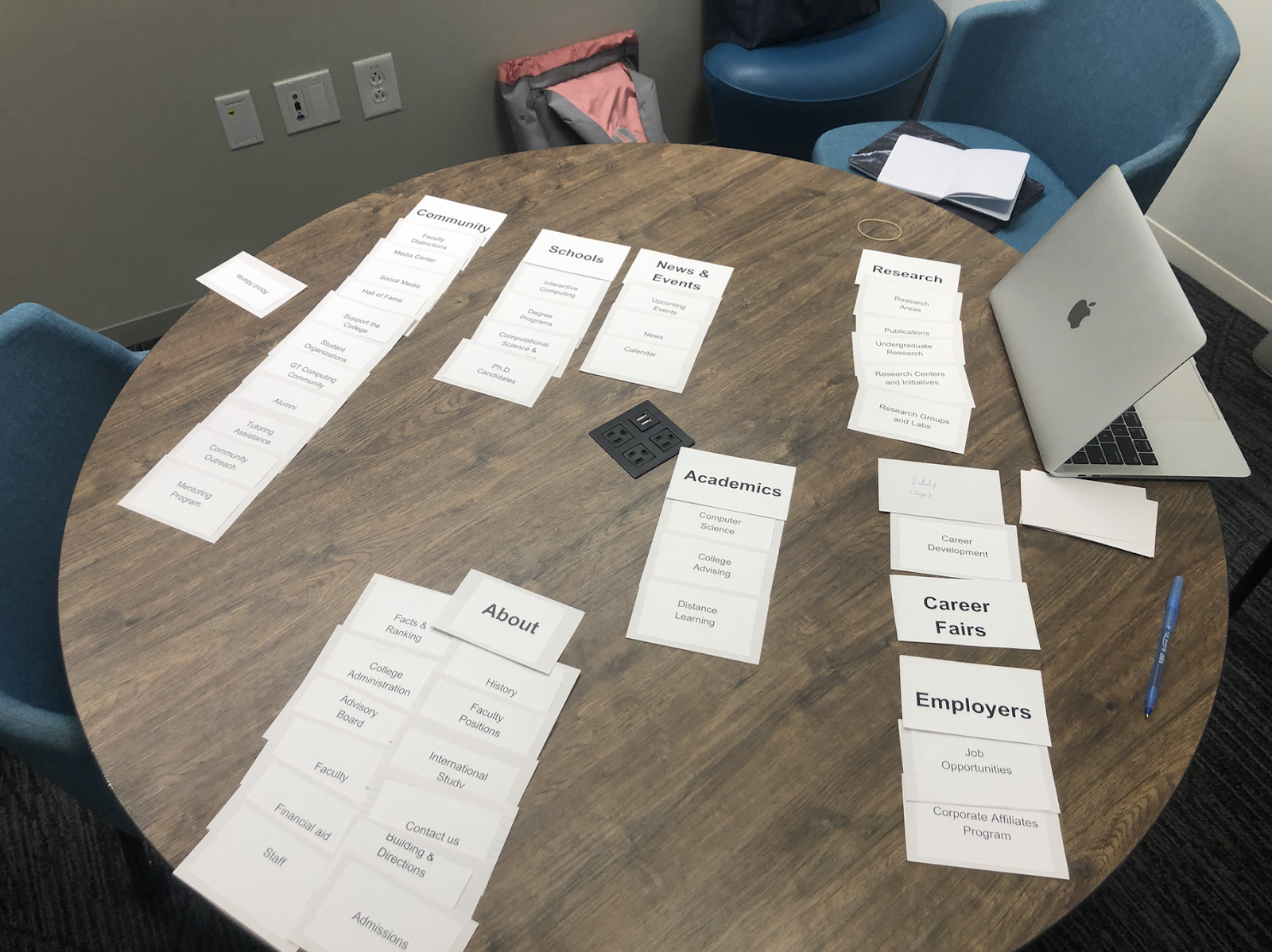
8 students sorted the website’s navigation items into categories that made sense to them. Results showed Research, News & Events, and Community were the most intuitive groupings, while categories like “Academics” and “People” had the least agreement. This directly informed the new IA.

Add: card sorting session photo

Competitive Analysis & Heuristic Evaluation

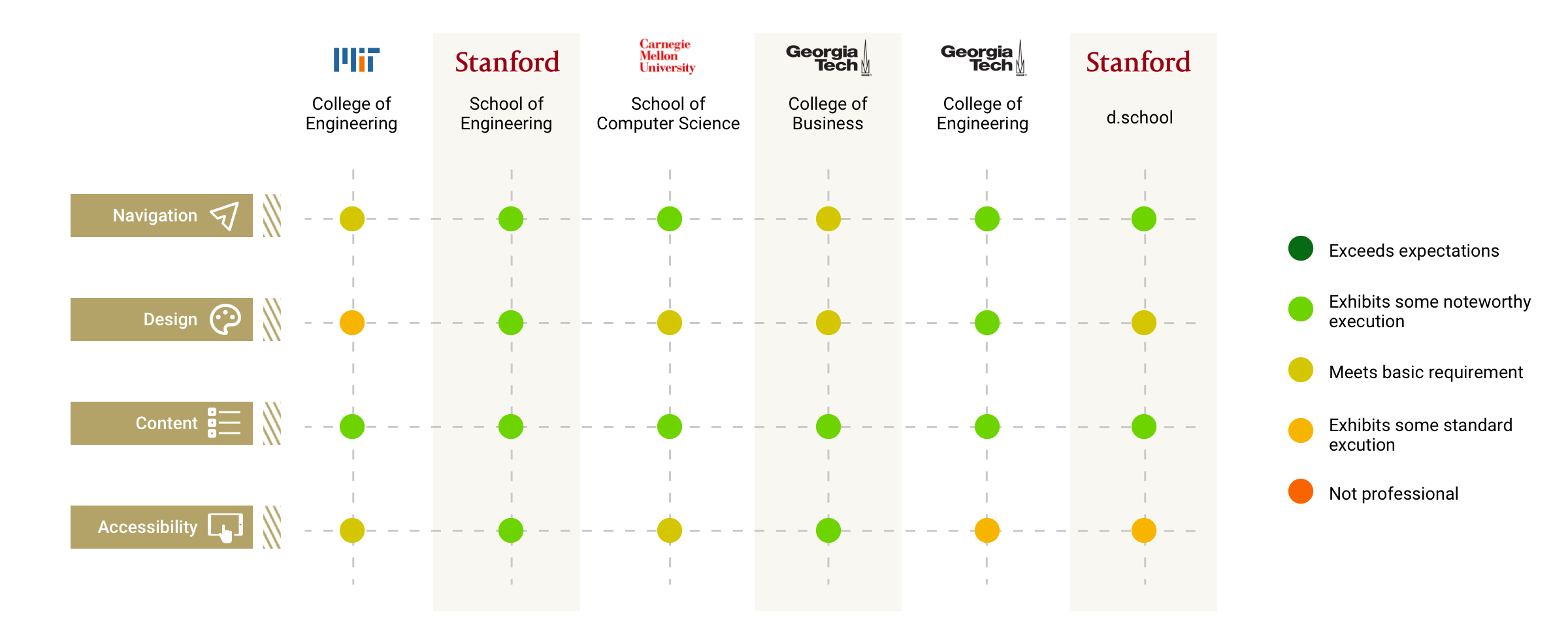
6 comparable institutions — MIT, Stanford, CMU, GT Engineering, GT Business, Stanford d.school

We benchmarked the CoC site against peer institutions across navigation, design, content, and accessibility. The CoC site consistently underperformed on design/branding and accessibility. This gave us a concrete standard to design toward and evidence to bring to stakeholders.

Add: competitive analysis dot chart

From raw data
to four design priorities.

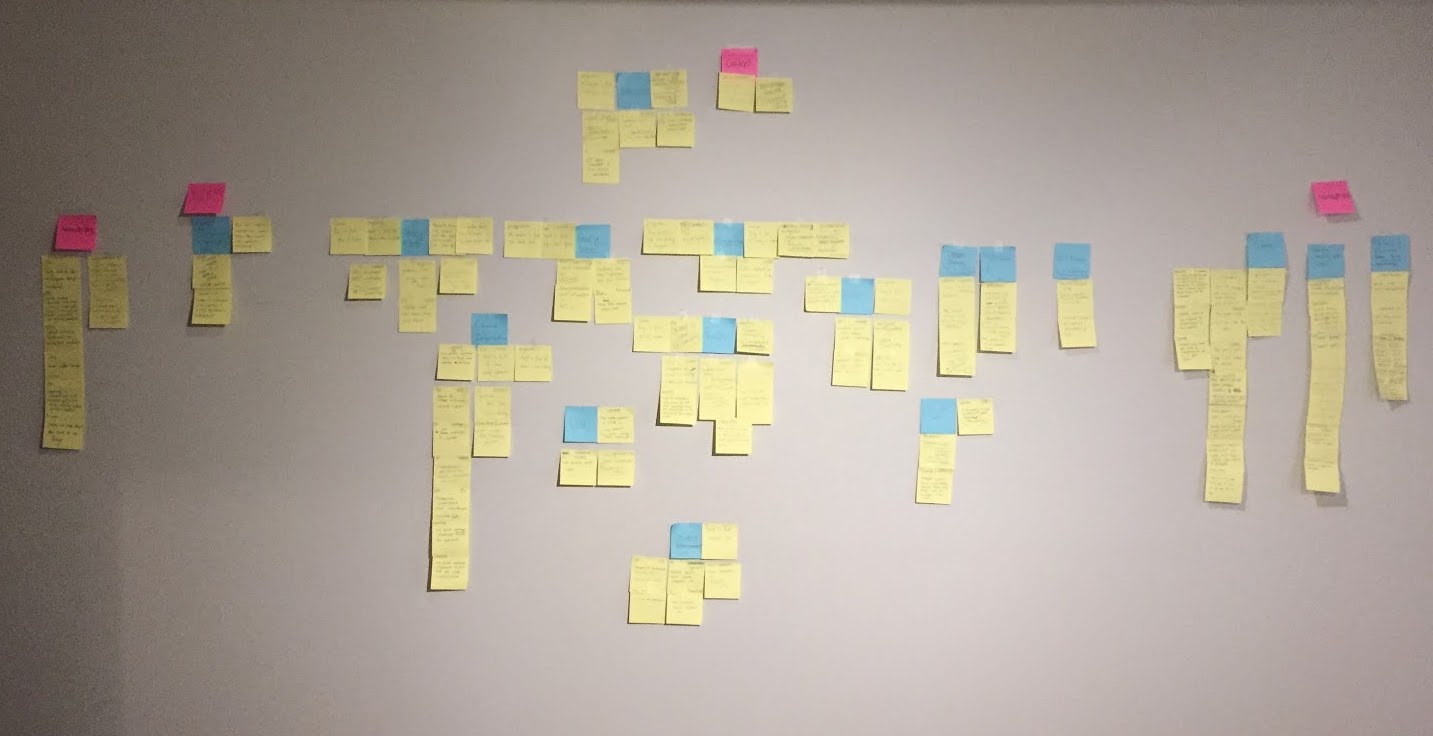
With data from five research methods, we needed a structured way to identify what mattered most. Affinity mapping let us cluster findings across all methods and see which themes were systemic — not just surface-level complaints.

Add: affinity map photo (sticky notes clustered on wall)
Affinity map synthesizing insights from survey, interviews, card sorting, analytics, and competitive analysis
01

Navigation & Organization

The global navigation didn’t reflect how users think about the site. Restructuring around user roles (not content types) was the highest-priority change.

02

Content Strategy

Pages were over-long with redundant information. Content needed to be audited, simplified, and organized with clear visual hierarchy and calls to action.

03

Mobile Responsiveness

No mobile optimization existed. Components needed to collapse, prioritize content, and maintain usability across screen sizes.

04

Accessibility

Meeting Level A & AA standards required fixing link text, image alt tags, color contrast, and programmatic structure throughout the site.

Two personas. Two very different journeys.

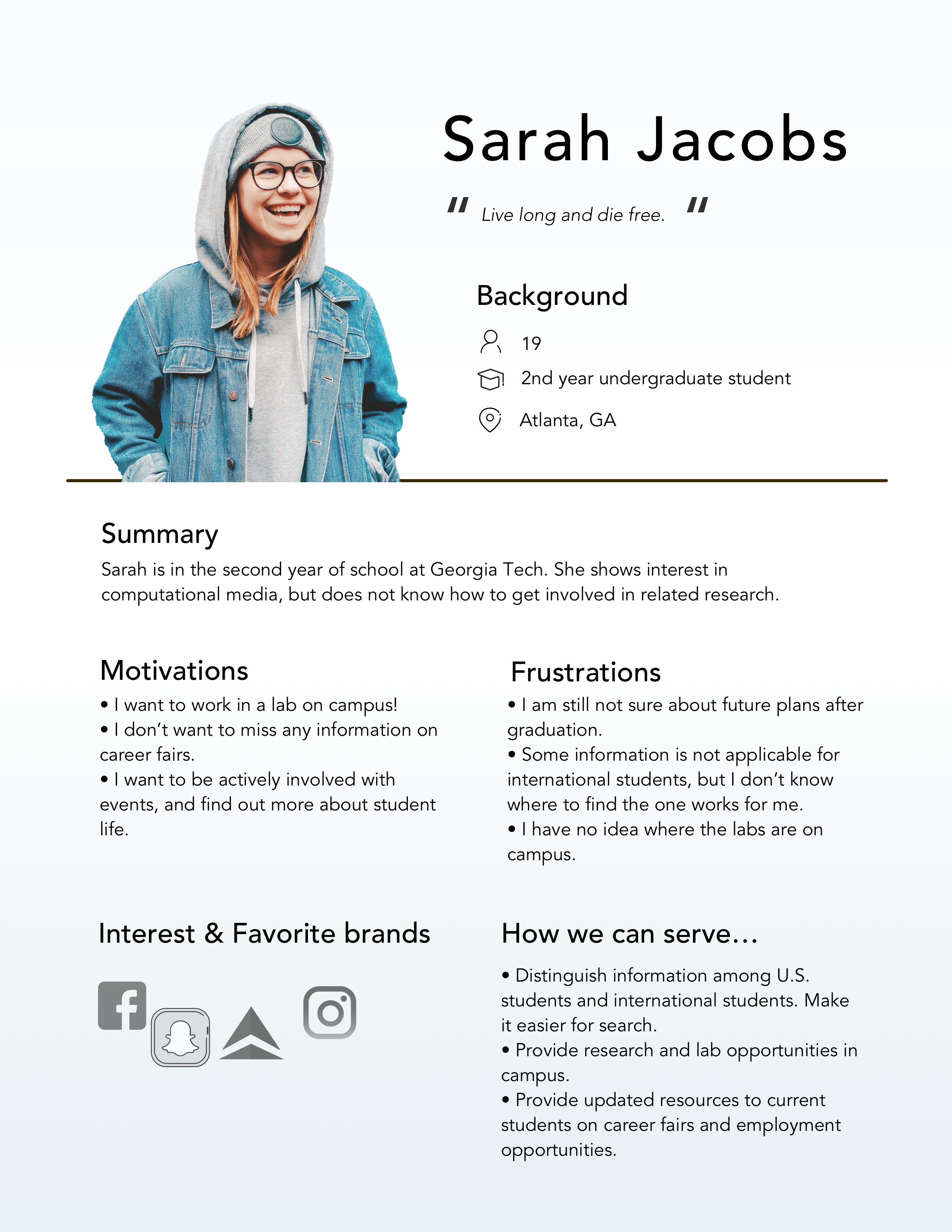
We created two personas from research data to represent the majority of CoC users and to ground every design decision in real needs — not assumptions.

Add: Sarah Jacobs persona

Sarah Jacobs

2nd-year undergraduate student

“Live long and die free.”

  • Find lab and research opportunities on campus
  • Not miss any important college announcements
  • Understand what academic resources are available

Key frustration: Still unsure about future plans after graduation; can’t find resources that would help her explore options.

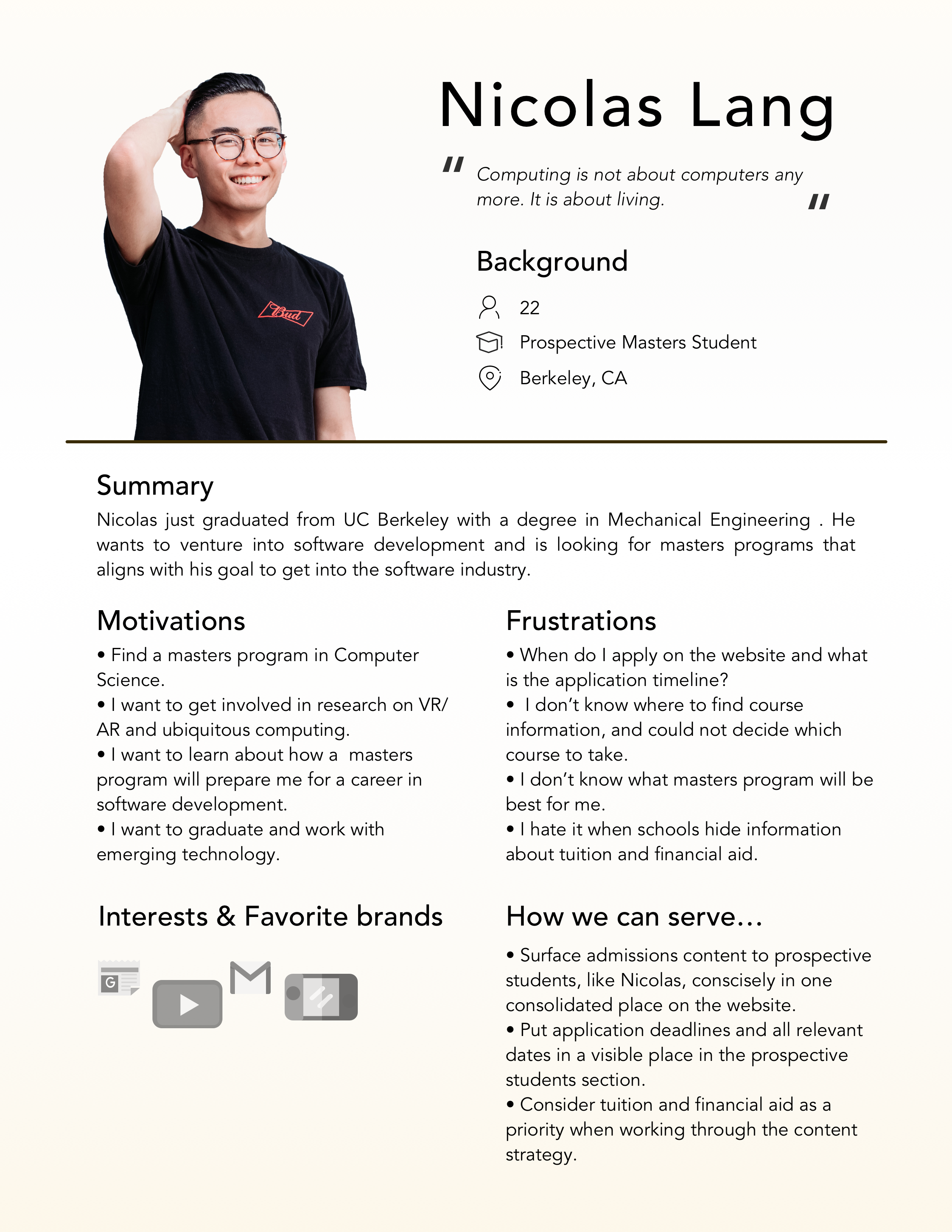
Add: Nicolas Lang persona

Nicolas Lang

Prospective master’s student

“Computing’s not about computers any more. It’s about a social living.”

  • Find a master’s program that fits his goals
  • Understand application requirements and deadlines
  • Determine which specializations prepare for software careers

Key frustration: Can’t figure out what he needs to do to apply or what makes each program distinct.

The information architecture decision

Card sorting data pointed us to two possible navigation structures. We debated both, and card-sort data plus persona analysis made the answer clear.

Option A — Content-based

Organize tabs around content type: Admission, Academics, Research, Industry, About, Schools.

Rejected: some people from other cultures have different interpretations of category names. Users opened tabs expecting one thing and found another.

Option B — Role-based ✓

Organize tabs around user roles: About, Prospective Students, Current Students, Faculty, News & Events, Support.

Chosen: users just need to find their tab and get all the content relevant to their role. Matches mental models confirmed by card sorting data.

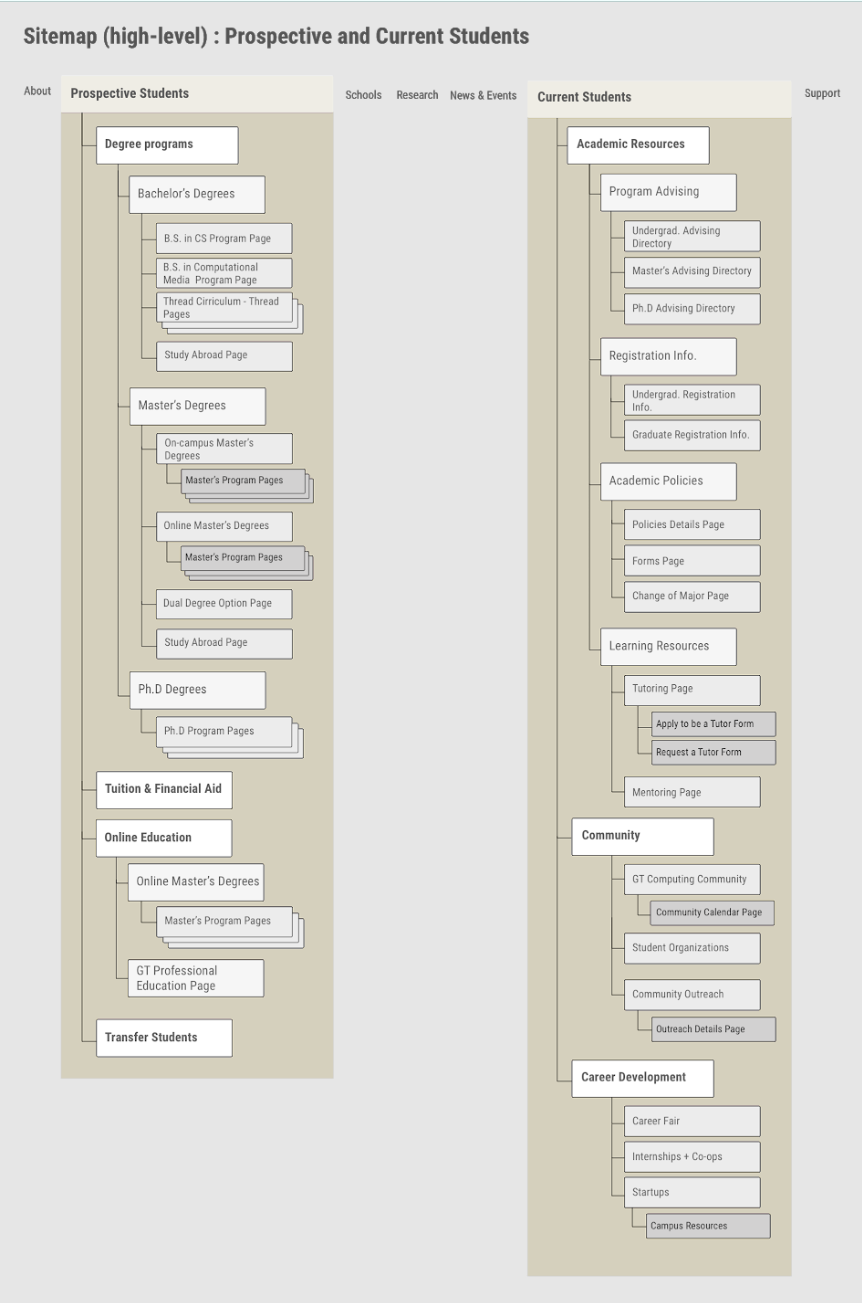
Add: new role-based sitemap / information architecture diagram
New sitemap organizing content by user role — Prospective Students and Current Students as primary entry points

Three decisions
that defined the redesign.

Rather than redesigning page by page, we built a component-based system — 12 reusable UI modules that can be stacked to create any page. This made the design scalable and easy for the CoC team to maintain going forward.

01 — Navigation

“Our website lacks clear navigation to useful resources for students.”

Three iterations to get the global nav right

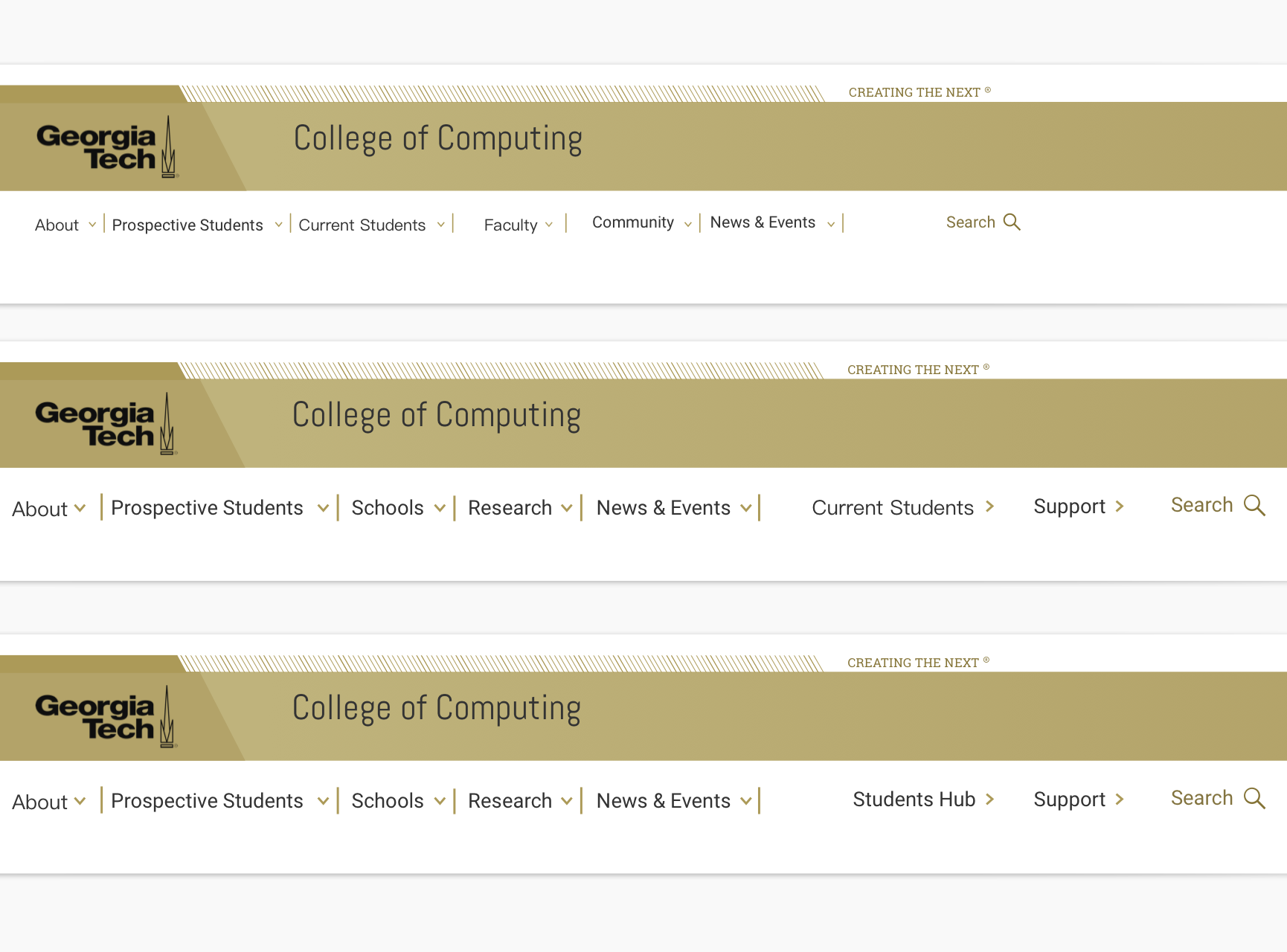
The most contested design question was where to place the “Current Students” tab. Our first instinct was to put it on the far right, separated from prospective students. But during feedback sessions, participants were confused — they expected current students to be next to prospective students since many users browse both.

After three navigation iterations, we settled on placing “Current Students” immediately next to “Prospective Students” — creating a clear student-focused cluster at the front of the nav.

Card sort + feedback sessions validated this final structure

Add: 3 navigation iterations showing tab order evolution
Three navigation iterations — role-based final structure chosen

02 — Component System

“Components are stacked on a single page — new content can be nested into existing templates.”

12 reusable modules instead of one-off pages

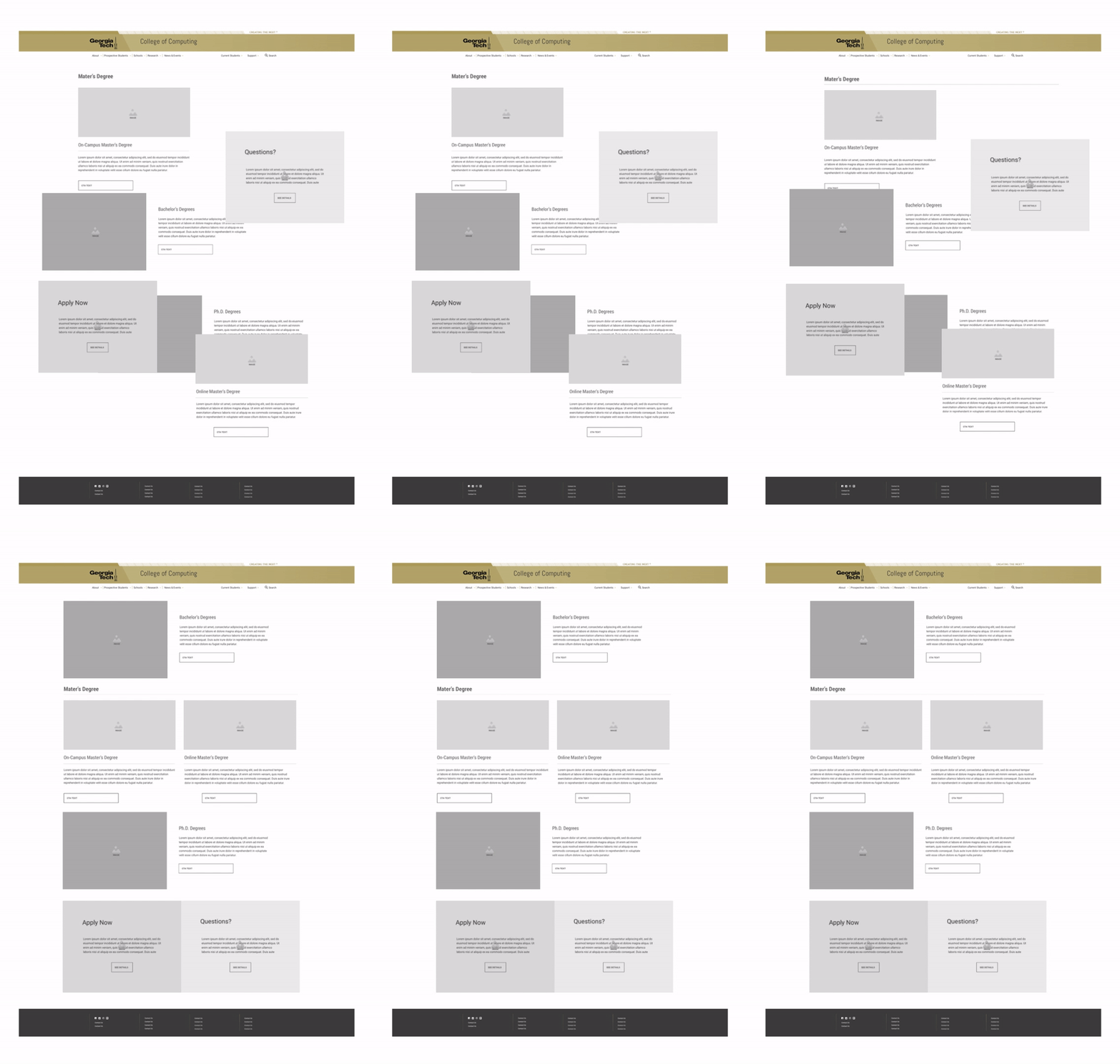
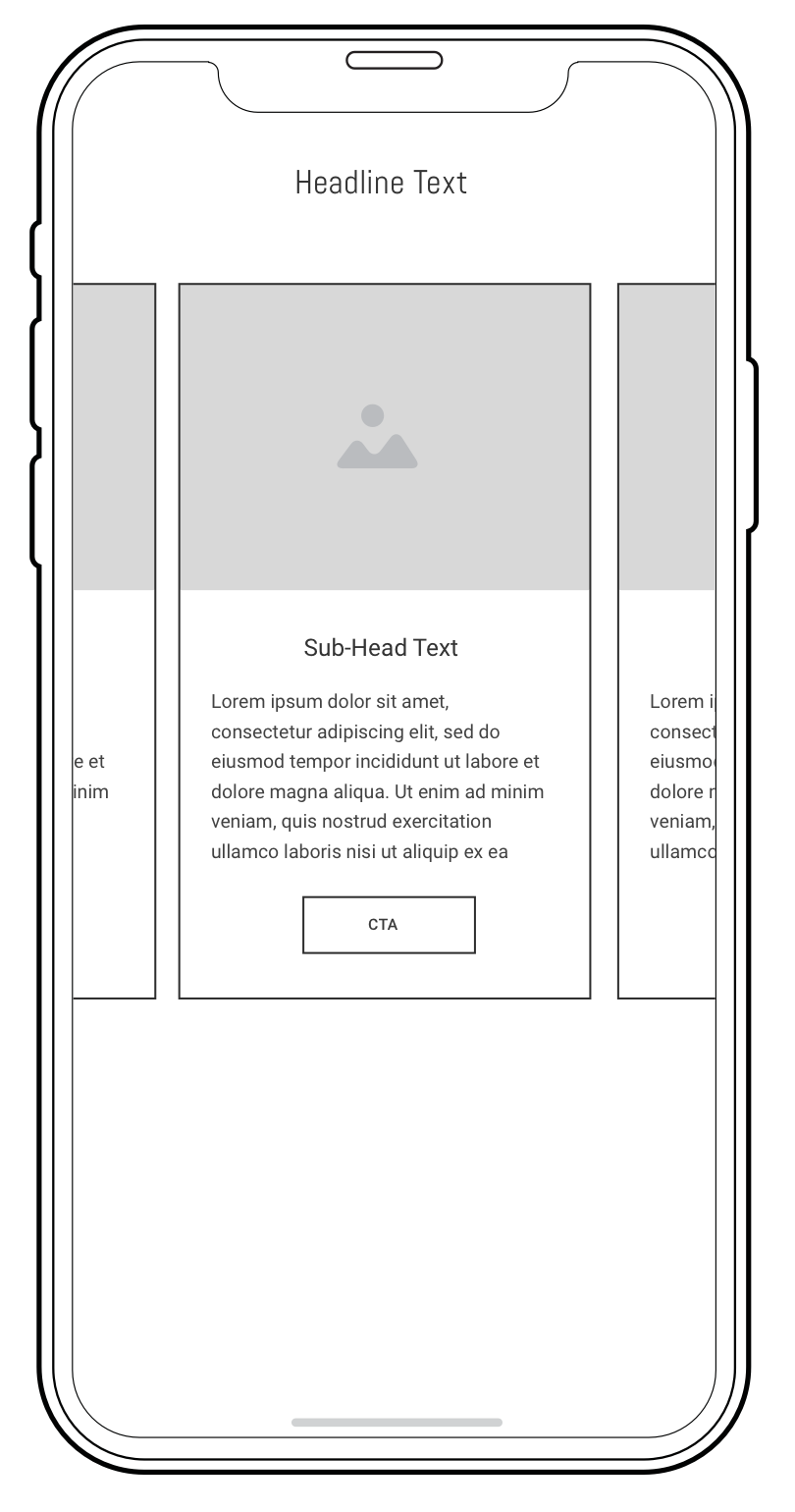
Instead of designing each page from scratch, we designed 12 UI components — hero areas, card grids, breadcrumbs, navigation headers, content modules, and more. Each component can be stacked and combined to build any page on the site.

This approach made the design system scalable and solved a real maintenance problem: the CoC team could update content without needing a designer for every change.

Modular system enables future content updates without design dependency

Add: component system wireframes / library overview
Component-based design — 12 reusable UI modules

03 — Mobile Optimization

“Pages were over-long — participants said they needed to scroll a while to get where they wanted to go.”

Collapsible components to fix the over-long pages problem

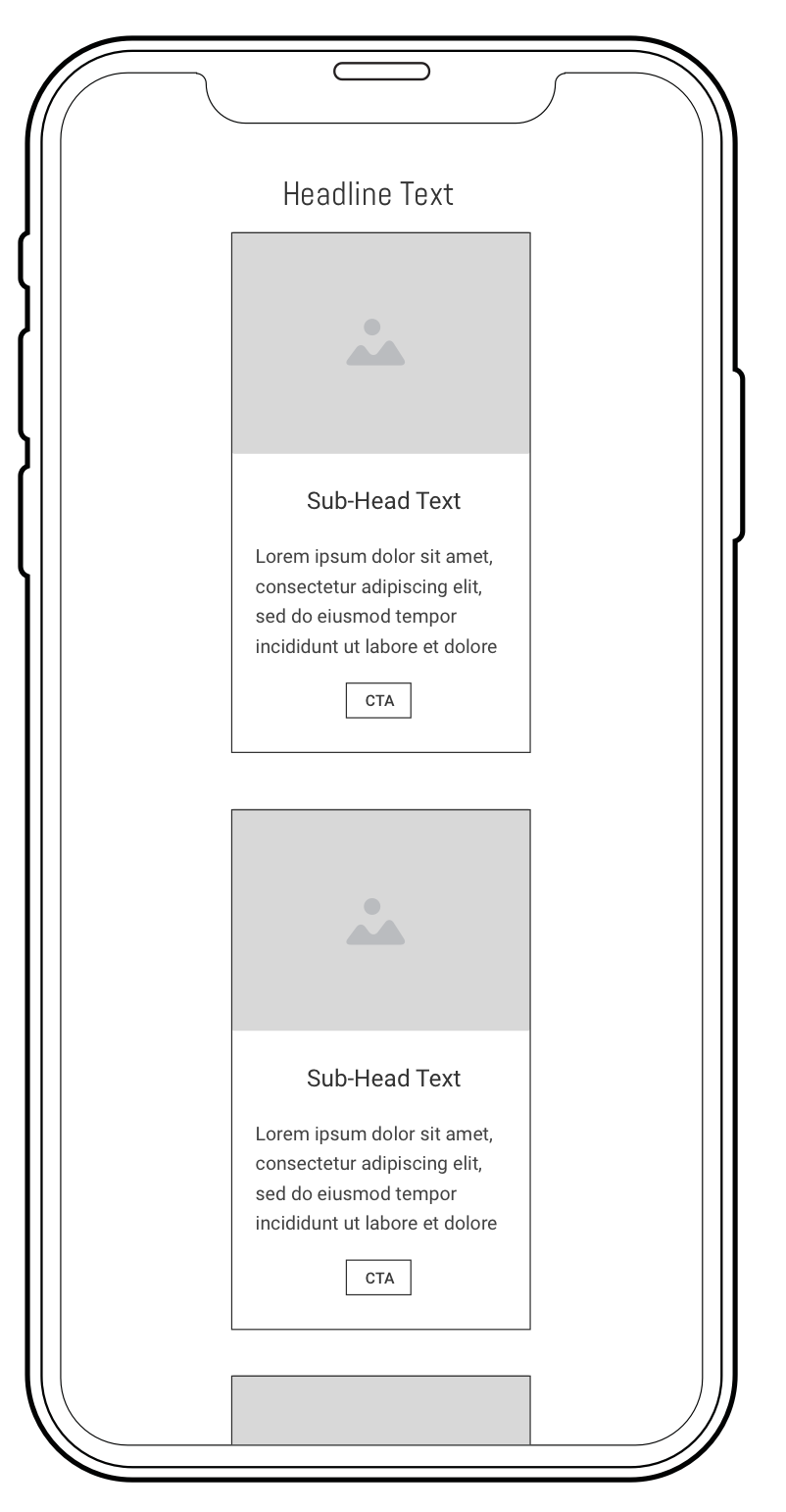
Feedback sessions exposed a critical mobile issue: pages were simply too long. Content that worked in a desktop grid became an endless scroll on mobile. Our solution was collapsible component modules that hide secondary content behind a toggle, significantly shortening the page while keeping information accessible.

We also recommended the administration team audit and reduce the content itself — because design can only do so much when the underlying content problem isn’t addressed.

Validated in second feedback session — collapsible content significantly reduced scroll depth

Before
Add: long mobile page (before)
Over-long mobile page before iteration
After
Add: shortened mobile page (after)
Collapsible components after iteration

High-fidelity prototype

Responsive hi-fi prototypes were built for both desktop and mobile, tested in final feedback sessions, and submitted to stakeholders for evaluation.

Add: hi-fi prototype on desktop + mobile device mockup
High-fidelity prototype — responsive for desktop and mobile, with role-based navigation

Tested twice.
With real users and real experts.

A/B Testing

via usertesting.com

Prototype vs. legacy site, 4 task scenarios

Participants were asked to find information across 4 scenarios: tuition, program options, advisor contact, and international student resources. We measured time to task completion for both the legacy site and the redesigned prototype.

  • Tuition: Dramatically faster on prototype — largest improvement overall
  • International students: Significant improvement, previously the most confusing journey
  • Program options: Faster, especially on mobile
  • Advisor: Marginal improvement (already relatively findable)
Add: A/B testing bar chart (task completion times)

Expert Heuristic Evaluation

4 HCI and design experts

Before & after scores on a 1–5 scale

Before user testing, 4 experts in HCI scored both the legacy site and the prototype across 4 dimensions. This gave us objective evidence of improvement and identified remaining areas to address.

Dimension Before After Change
Information Architecture 2.5 3.33 +33%
Design & Branding 2.3 3.75 +63% ★
Content 3.6 3.70 +3%
Accessibility 3.0 3.73 +24%

★ Biggest gain: Design & Branding improved 63%, confirming the component-based visual system and updated branding were the most impactful changes.

“Significant progress shows in finding information about tuition and international students.”
— A/B testing finding, usertesting.com

What I’d do differently.

Mobile content strategy is separate from mobile layout

We solved the layout problem with collapsible components, but the underlying content was still too long. If I were doing this again, I’d advocate earlier and louder for a content audit as a design prerequisite, not an afterthought.

Test with a more diverse user sample

Our card sorting used 8 students. We saw signal, but a larger and more varied sample (including international students, faculty, and prospective students) would have given us more confidence in the role-based navigation choice.

Involve the development team earlier

The component system was designed with future maintenance in mind, but it would have been stronger if we’d collaborated with the CoC engineering team during design to validate technical feasibility of each module.